Search This Blog

Showing posts with label technology. Show all posts

Tuesday, September 6, 2016

Quote Analyses in Canvas Discussions

My Pre-AP students took a test over their summer reading today, and I needed an extension activity for those students who finished sooner rather than later. Since I administered the test in Canvas, I decided to create something else for my kids to do online, as that is usually what keeps them the quietest. 

This summer, I attended an AVID conference strand called AVID Academic Language and Literacy. One activity introduced was using a quote analysis (reading) to lead to academic discussion (for listening and speaking), as well as review and revision (writing). The process involves responding to a quote with a writing frame, then sharing and discussing with a partner using academic language scripts, leading to revision.

I needed a quiet classroom, however, so I moved this process to a discussion board within Canvas. The discussion board allows threaded replies and likes, similar to Facebook (but without all the cute cartoons). I am also able to join my two separate Pre-AP classes together for one cross-class conversation.


Although there were some initial struggles due to the lack of direct instruction with this instruction, the kids caught on quickly. For a first try, they didn't do too bad. Their responses included statements like "I agree with..." and "I like what you said about...". Then at some point, they became the grammar police, pointing out mistakes that needed to be corrected and directing classmates to use the entire writing frame for their responses. Talk about teaching made easy! 

This initial trial run has definitely given me incentive to pursue this further, adding depth and rigor as we move throughout the year. My student teacher did inform my kids that this is part of what she has to do in her college classes, so she may prove to be a valuable resource in this arena.

Sunday, February 21, 2016

Adventures in Technology: TodaysMeet in the Classroom

During our English PLC, Susan Anderson from our Instructional Technology Department came by to share some online sites to help us with formative assessments. Although I was familiar with some of the tools, Susan provided some alternate uses that I had not previously considered with those both known and unknown to me. 

My students recently worked on a collaborative story writing assignment in Google Docs.  In order to discuss their work without speaking while some students were finishing a district exam, I allowed them to use the chat box within the document to communicate with their partners about what they were writing. As I walked around glancing at their work, I was pleasantly surprised that no one was talking about anything more inappropriate than wanting to see the Deadpool movie. 

In order to communicate with me without blurting out and calling my name, I set up a Today's Meet forum. This is a site that Susan showed my department. I have used TdoaysMeet in meetings containing over one hundred people, but I never even thought about using it in class. Susan talked to us about using it as a backchannel for conversations while other things are taking place in class, and this was the perfect opportunity for me to try it out. Well, let me just say, best made plans... 

My first Pre-AP class is definitely a gifted group. So gifted in fact, that when asked to type a name to identify themselves to others, they started using my name as well as the names of their classmates. No one knew who anyone was. Fake versions of me were threatening to write referrals, and a very strange rap battle took place (I think one version of me may have won). 


In my academic classes, I can guarantee that Student E. finds some way to work my nerves on a daily basis, and for some reason, I still love him. I figured that without being able to speak out loud, it would be a peaceful day in Student E. land. Wrong! He did not understand my response to his request to go to the restroom, despite four other students typing for him to go. He did not believe them, as he thought I was correcting his grammar - which I had done initially. 

My last class of the day actually used the site as I had intended: by asking questions about their assignment. Do we need paragraphs? Can I add the title to the slide? How do we get our work back if it was lost? This group is often quite unfocused as they come to me after lunch, but using TodaysMeet actually seemed to help them. 

Out of my five classes, only one pushed the boundaries. This class is always on warning with technology, but I want them to have the exposure and always give them a "second" chance. They used TodaysMeet to say hello to one another, to tell jokes, to ask to go to the bathroom, to ask to go to the bathroom, and to ask to go to the bathroom. They were, however, working on their assignment, so I did not go to hard on them. Because we had not had a formal conversation about how to use the site, I took responsibility for the situation and know that in the future, I will need to set firmer ground rules. 

Although this was a trial run, I can see myself using the site again in the future. I want to put some more thought into how I can use it effectively in a blended lesson. Stay tuned. 

Sunday, February 7, 2016

And just like that, we were in a blended learning environment!

I use technology as often as possible in my classroom. I am fortunate to have a 2:1 situation - one Chromebook and one iPad per student. I have to admit, though, that the work we do online is not terribly original. We tend to stick to basics. I do try, however, and I am slowly branching into new territories with my kids that I have not thought they would be able to handle previously. Right now, my focus is on how I can get students working collaboratively in a digital environment. 


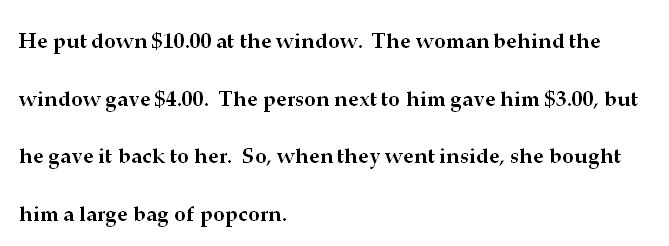
In my graduate reading class this week, we were discussing the following passage from Kylene Beers' When Kids Can't Read.  I want you to try to figure out what the passage is about before moving on. The struggle, if you have one, is part of the process. 


 ______________________________________

 ______________________________________


Are you ready? Did you figure it out? Then keep on readin'. 


In my class of adults, there was a great deal of discussion about the information in the passage. I own the Beers book and have used this particular passage in a number of workshops, so I did not have any original thoughts to contribute. I sat back and listened to what my peers had to say. One classmate got hung up on the numbers from the beginning, thinking it was a math problem. Most everyone got past that stage and pieced together a general idea of what is happening, but we were all making up completely different stories about who the people are - a married couple, a first date, friends, a brother and sister. 

Back in my eighth grade classroom, I knew I had some time to fill. We recently finished a unit, and I had a couple of days open prior to a district test. Why not see what the kids think of this passage?

I started by giving my students the passage and asking what it was about and how they figured it out. Quite a few thought it was a math problem and could not get past that idea. I actually had to have kids act out the scene in one class to try to get the kids to see it as a mini story. Once we walked through the passage, like my college peers, my students immediately began making up stories about who the people were and what the situation was. So I ran with it. 

Image result for harry potterFor the first time ever (insert drumroll here), I have students working collaboratively in a Google Doc. They are writing the full-length story of the initial few sentences. My students are sitting face-to-face in order to discuss what they want to write, then they are writing together in a single document. I walked them through setting up the document step-by-step, and you would have thought I had performed a spell straight out of Harry Potter. They oohed and aahed like I was the greatest wizard to ever live. 

Since I have not done this type of assignment before, I was concerned that the kids would be off-task, but I can honestly say that not one single student was discussing anything but the story. Two of my girls are writing the world's greatest love story, and when class ended the other day, one told me that she could not leave her characters hanging all weekend; she needed to know what was going to happen with them. Two of my boys are writing a fantasy version. Two others have turned the passage into a story about my date with John Cena (currently my imaginary boyfriend who doesn't know we are involved). Many students could not believe that I was having them stop because class was ending. They were completely engaged in what they were doing. 

In addition to all of these wonderful moments, the best thing I realized about this impromptu lesson is that I have blended learning taking place. Blended learning is an important component of the new Texas teacher evaluation system that will be put in place next year, and I feel like I am working through some practice rounds to prepare for that. My students are working together both face-to-face and online. They have control over the content of their story. They are determining the structure of their collaboration, and each partnership is quite different. 

This might not be a giant step for mankind, but it is a step for my classroom and for my own thinking. Sometimes I do not think I give my students enough credit for all that they are capable of, but I am determined to continue pushing myself to break out of my safe zones in order to challenge them, even if it's only one baby step at a time. 

Monday, January 27, 2014

Fun Friday: Playing with our new Ipads

As part of the Texas Literacy Initiative, my school received two carts of brand new Ipads. The carts had been in my room for a few days, but my students did not notice. They were a bit surprised when I said we were going to be getting them out. Then they were a bit disappointed when I said we were going to be playing word games. 

Despite their initial thinking, the word games were a hit. I gave them a list of apps to choose from, and each class seemed to have its own favorite. I expected groans, and lots of this is boring. Instead, I saw students working together to figure things out. They asked questions when they were stuck. They told me they learned things. I was really impressed, and I am excited to do this again. 

The choices (we used the free versions of all apps):
  • RhymieStymie - determine a set of synonyms that rhyme together
  • This is to That - solve analogies
  • Get+Together - figure out compound words based on clues and pictures (this one was really good for my ELLS)
  • Grading Game - find all of the errors in a paper or be fired
  • Idiom Stories - What does the idiom mean? (another good one for my ELLs)
  • Word Stack - put together words by association